.png?width=1584&height=396&name=Onboarding%20Central%20(1).png)
Head to your inbox and look for two emails we’ve sent you — they include your startup essentials: passwords, resources, and everything you need to hit the ground running.
Subject lines:
Branding and Marketing
Please note: Your focus should center around your ONBOARDING tasks and checklists.
ALL OF THE RESOURCES YOU NEED TO GO LIVE
Follow these steps in order in conjunction with your in-app checklists.
1. Foundations
This session is offered for new Business Admins to ensure they navigate the Onboarding resources with ease and GO LIVE with confidence.
We always recommend attending the live session when possible — it’s a great opportunity to meet the Business Success Team face to face, ask questions in real time, and make sure you’re starting off fully supported.
This recording is designed to give you the same valuable information we share during our live Foundations Call. You’ll get all the key details here.
2. Onboarding
Below, you will find four videos that comprise the Onboarding Webinar.
We recommend you watch these videos BEFORE attending the LIVE Webinar so that you have a basic understanding of each topic and reinforce learning.
-
▶️ Hydreight App Overview - Password: Rs2b^93R
- ▶️ Backoffice Setup
- ▶️ Services Setup
- ▶️ Service Provider Account (CSP)
While watching the videos, jot down your questions to bring to the webinar.
🔗 Patient Specific Service SetupThis page outlines all patient-specific services available and provides step-by-step guidance for setting each one up in your business account within the app.
LIVE Onboarding Webinar
🔗 Thursdays at 12pm EST
3. Ordering Portal
These short clips are imperative to your E-learning. We strongly suggest watching these before setting up your Ordering Portal Account and placing your first order.
📦 CREATE A FREE MY CHOICE UPS ACCOUNT 🔗
*** It's free and REQUIRED for shipping ***If you do not create a free My UPS choice account deliveries from UPS may be returned to sender.
Bookmark & SAVE***
🔗 321 RULE PDF
▶️ 321 RULE
🔗 FAQs - Ordering Portal ** Always check the FAQs page first, as this is where the most accurate and updated information is. **
DREAM BUNDLE/CREDIT
Our Ordering Team will be notified by Onboarding once you're LIVE in the app.
*Please allow 7-10 business days for us to fully process your dream bundle/code once you have gone live*
4. Booking Flow
5. Live Support Q&As
1 hour Q&As
- Chief Medical Officer
🔗Mondays at 12pm EST - Onboarding
🔗Wednesdays at 1pm EST - Business Success
🔗Wednesdays at 2pm EST- Find the password for the site in the "Meet the Success Team" email.
- Ordering
🔗Thursdays at 1:30pm EST
6. Account Review - FINAL STEP
At this point you should have as many checklist items COMPLETED on your own BEFORE setting up your account review with our Onboarding Specialists.
Bring all of your remaining questions, concerns and roadblocks to your Account Review to make the most out of your 1x1 support session.
Schedule with one of the Onboarding Specialists:
🗓️ Brianne
🗓️ Shweta
Once complete, you should be confident and ready to REQUEST TO GO LIVE
Welcome to Hydreight!
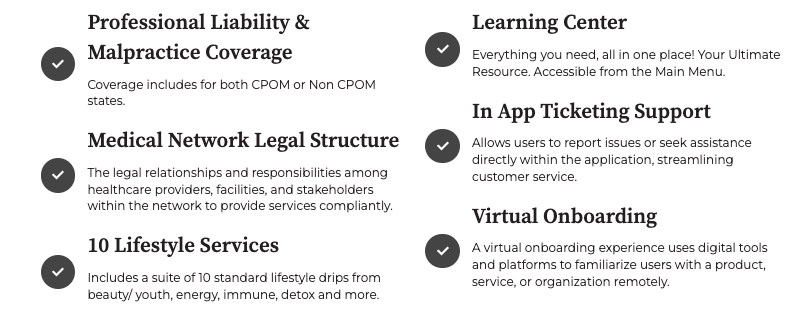
By joining the Healthcare Prosoft GPO Network and Hydreight platform, you gain access to:

Olympia (Vendor)
To begin purchasing Olympia vitamins, please complete the updated account registration form.
📝 A new form is required for all accounts.
⚠️ Important: Olympia currently needs 7–21 business days to process new account requests.
UPS Access Point Deliveries
-
If you plan to use a UPS Access Point located inside another retail store (e.g., CVS), Olympia will review your submission and decide whether delivery is feasible.
-
Before listing a UPS Access Point, please contact the location directly to confirm they can accept cold-shipped items (required for vitamin orders).
-
This applies to all UPS Access Point deliveries.